
7 Most Affordable LMS Platforms for Corporate Training (2026)

Updated On:
June 27, 2026
Mahesh Kumar
Founder, TraineryHCM.com
Affordable LMS Platforms

Table of Contents

A corporate L&D budget rarely has room for surprises. Yet LMS pricing is one of the most reliably surprising categories in enterprise software: a platform marketed at $3 per user per month can easily land at $18 per user once implementation, SSO, API access, and a basic support contract are factored in. Meanwhile, a platform with a higher base price and broader capabilities can cost less over three years simply because it replaces two or three point tools you were running alongside the cheaper option.

This guide cuts through that noise. It covers seven platforms that genuinely serve different budget situations in 2026, what each one actually costs where pricing is publicly available, how their pricing models work at different learner counts, and what each one does and does not include, so you can evaluate them against your real training stack, not a theoretical one.

What Is an Affordable LMS?

An affordable LMS (learning management system) is a platform that delivers an acceptable total cost of ownership for an organization's specific learner count, training mix, and growth trajectory. 'Affordable' is not a fixed price: a $3/user/month platform can cost more than a $10/user/month platform at 500+ learners if the cheaper option charges extra for SSO, reporting exports, or instructor-led session tracking. Affordable LMS evaluation should always compare the total cost based on license, implementation, integrations, and support rather than the headline per-user price alone.

How LMS Pricing Models Actually Work

Before comparing platforms, understanding the three main pricing structures prevents budget surprises:

Per Registered User

You pay for every user with an active account, regardless of whether they completed a course recently. Common in SMB-tier plans. This model penalizes organizations with seasonal learners or large inactive populations.

Per Active User

You pay only for users who logged in or completed something in a given billing period. Better for organizations with fluctuating learner activity, common in mid-market platforms. Watch for varying definitions of 'active.'

Flat Rate / Modular

A fixed fee for a defined set of capabilities, independent of user count (within a band). More predictable for fast-growing teams. Some platforms combine flat rates with modular add-ons for coaching, credentials, or TMS functionality.

The practical implication: at 200 learners, per-registered-user pricing at $4/user/month costs $800/month. At 1,000 learners, the same model costs $4,000/month. A flat-rate platform at $2,000/month for up to 1,000 users is cheaper at scale, despite appearing more expensive in a feature sheet comparison.
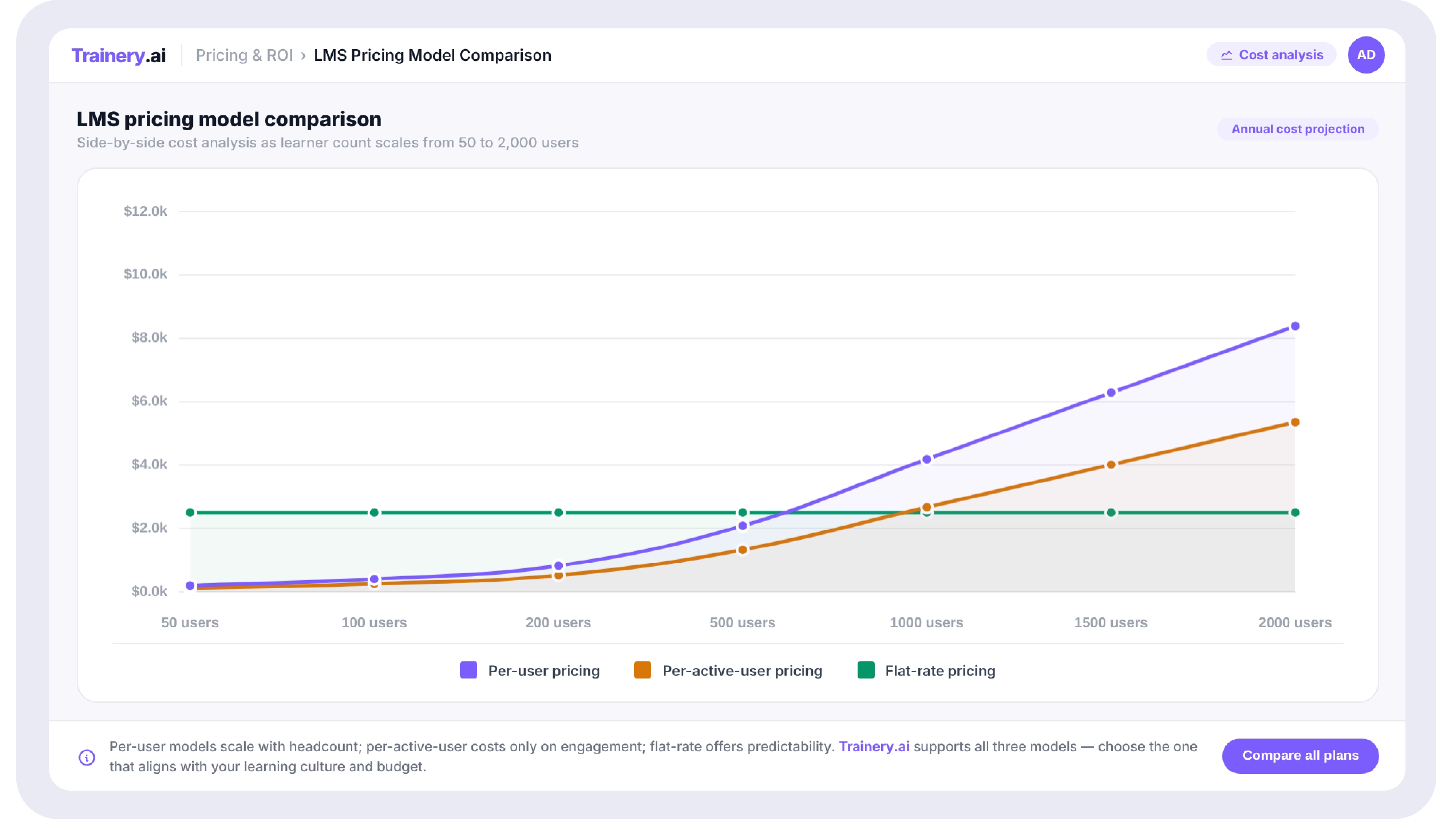
Side-by-side line chart comparing per-user, per-active-user, and flat-rate LMS pricing models as learner count scales from 50 to 2,000

Hidden Costs That Rarely Appear in the Headline Price

The platforms below list starting prices where available. Before finalizing any evaluation, ask every vendor for a written breakdown of the following:

  • Implementation and onboarding fees (commonly $2,000–$15,000 depending on platform complexity)
  • Data migration from your existing LMS bulk imports, SCORM content uploads, and user record transfers
  • SSO (Single Sign-On) integration is included in some platforms, a paid add-on in others, and occasionally only available on higher tiers
  • API access critical for HRIS sync; free on some platforms, gated behind enterprise tiers on others
  • Custom branding and white-labeling, which may cost extra on entry-tier plans
  • Support tier email-only is standard at most entry prices; phone and dedicated CSM support typically require upgrades.
  • ILT session management: if your team runs instructor-led training, check whether scheduling, registration, and attendance tracking are included or require a second tool

Running ILT and e-learning on two separate tools?

Most LMS platforms don't include a built-in Training Management System. Trainery combines both LMS and TMS with coaching and credentials in one modular platform, so you're not paying for a second scheduling tool alongside your LMS.

Book a Demo

The 7 Most Affordable LMS Platforms for Corporate Training (2026)

Platform Best For Starting Price Pricing Model
Trainery Teams needing LMS + TMS + credentials in one platform Custom (modular) Per module, per user
TalentLMS Small teams running simple online courses From $69/mo (up to 40 users) Tiered per registered user
Moodle Organizations willing to self-host for near-zero license cost Free (hosting/dev costs extra) Open source; host or use a partner
iSpring Learn Teams wanting an integrated authoring tool + LMS bundle From $2.82/user/mo (50 users) Per registered user
SkyPrep SMBs wanting simple deployment without long implementation Custom quote Per active user
LearnUpon Multi-audience training (employees + partners + customers) Custom (3 tiers) Tiered by user count
Docebo AI-driven LMS with content marketplace at mid-enterprise scale Custom (tiered) Per active user bands

01. Trainery Best Value for Teams That Need More Than E-Learning Delivery

Starting Price: Custom, modular start with TraineryLMS alone and add modules as needed

Who It's For: Corporate L&D teams that run e-learning and instructor-led training together, or that need credential tracking alongside course delivery, and don't want to pay for two separate platform contracts.

What makes Trainery relevant in an affordability comparison is its architecture. Most LMS platforms on this list require a separate Training Management System for ILT scheduling, a separate coaching tool, and a separate credentialing system. Those additional contracts, typically $5,000 to $30,000+ per year, depending on the tool, are invisible in a per-seat LMS comparison but very visible on the annual budget.

Trainery prices modularly: TraineryLMS, TraineryTMS, TraineryCoaching, and TraineryCredentials each license independently. An organization can start with TraineryLMS only and expand into TMS or credentials as training operations grow, without switching platforms or renegotiating a separate vendor contract.

Key practical capabilities:

  • SCORM, xAPI, and AICC content support with role-based learning paths
  • TraineryTMS is available as an add-on module for ILT scheduling, instructor assignment, and cost tracking without a separate vendor.
  • TraineryCredentials tracks license renewals and certification expiry with automated reminders.
  • TrAI provides AI-driven recommendations and manager-facing insights across all modules.
  • Extended enterprise training: employees, customers, partners, and association members from one login system

Note: Trainery requires a custom quote. It's not the right fit for a team of 50 with no ILT needs in that scenario; TalentLMS or iSpring's published entry pricing may produce a lower Year 1 cost. Trainery's value case strengthens as training complexity increases.

02. TalentLMS Lowest Entry Price, Best for Simple Online Course Delivery

Starting Price: From $69/month for up to 40 users; $149/month for up to 100 users; $279/month for up to 300 users (published pricing as of mid-2026)

Who It's For: Small teams and growing SMBs that need a quick-to-deploy LMS for online courses, with minimal ILT or compliance documentation requirements.

TalentLMS is the most common entry point in this category, and its published pricing is genuinely transparent at the SMB tier. For teams under 100 users running straightforward self-paced courses, the $149/month plan provides course delivery, basic reporting, and gamification at a price few platforms can match.

The friction appears at scale. Reviewers on G2 note that training history is overwritten when annual courses are retaken rather than preserved alongside prior records, which creates compliance documentation gaps for regulated organizations. ILT session management is basic compared to dedicated TMS tools. The platform does not publish a SOC 2 Type II security report, which creates procurement delays at enterprise IT reviews.

Key practical capabilities:

  • Published per-user pricing tiers, budget approval doesn't require a vendor call
  • SCORM and xAPI content support
  • Basic ILT session creation (without instructor capacity or cost tracking)
  • Gamification and a course catalog are available across all paid plans

Best for: Teams under 100 users with no regulated compliance requirements and no instructor-led training at scale.

03. Moodle Free License, but Total Cost Depends Entirely on Your Technical Setup

Starting Price: The software is free and open source. Managed hosting (MoodleCloud) starts at approximately $80–$120/month for small deployments; self-hosted requires server costs and development resources.

Who It's For: Organizations with in-house technical capacity, or those working with a Moodle partner, that want to avoid per-user licensing entirely.

Moodle's zero license cost makes it attractive on paper, but the total cost of ownership depends on how an organization deploys it. Self-hosting requires server infrastructure, regular updates, plugin management, and internal or contracted development support. MoodleCloud removes the hosting burden but brings its own pricing and feature limitations compared to self-hosted.

For organizations with technical resources or an existing Moodle partner relationship, it can be genuinely low-cost at scale. For organizations without those resources, the savings on licensing often get consumed by implementation and maintenance.

Key practical capabilities:

  • No per-user license cost does not scale with headcount
  • Highly customizable via plugins and custom development
  • Strong community documentation and support ecosystem
  • Extensive integration options for HRIS and third-party tools via plugins

Best for: Organizations with IT or development resources, or established Moodle partner relationships, that need to scale without per-seat costs.

04. iSpring Learn Strong Authoring-Plus-LMS Bundle at a Competitive Per-User Price

Starting Price: Approximately $2.82/user/month at 50 users; pricing decreases with higher user counts. Includes the iSpring Suite authoring tool in some bundles.

Who It's For: Teams that need to create custom course content internally and deliver it through an LMS, without paying for a separate authoring tool.

iSpring's pricing is one of the most transparent in this category. The per-user rate at small user counts is published and verifiable. Its primary differentiator is the bundled authoring toolset (iSpring Suite), which allows course creation in a PowerPoint-native environment without a separate Articulate or Adobe Captivate license.

The platform is less suited to organizations that run significant ILT, need advanced compliance reporting, or are extending training to customers and partners. Reporting is functional, but reviewers note limitations for organizations needing complex multi-department or multi-role reporting structures.

Key practical capabilities:

  • Per-user pricing starting below $3/user/month for smaller teams
  • Integrated course authoring tool reduces the need for a separate content creation license
  • Mobile-ready delivery
  • Quiz and assessment builder built into the authoring environment

Best for: Teams that create most of their own course content internally and want a single vendor for both authoring and delivery at a transparent price.
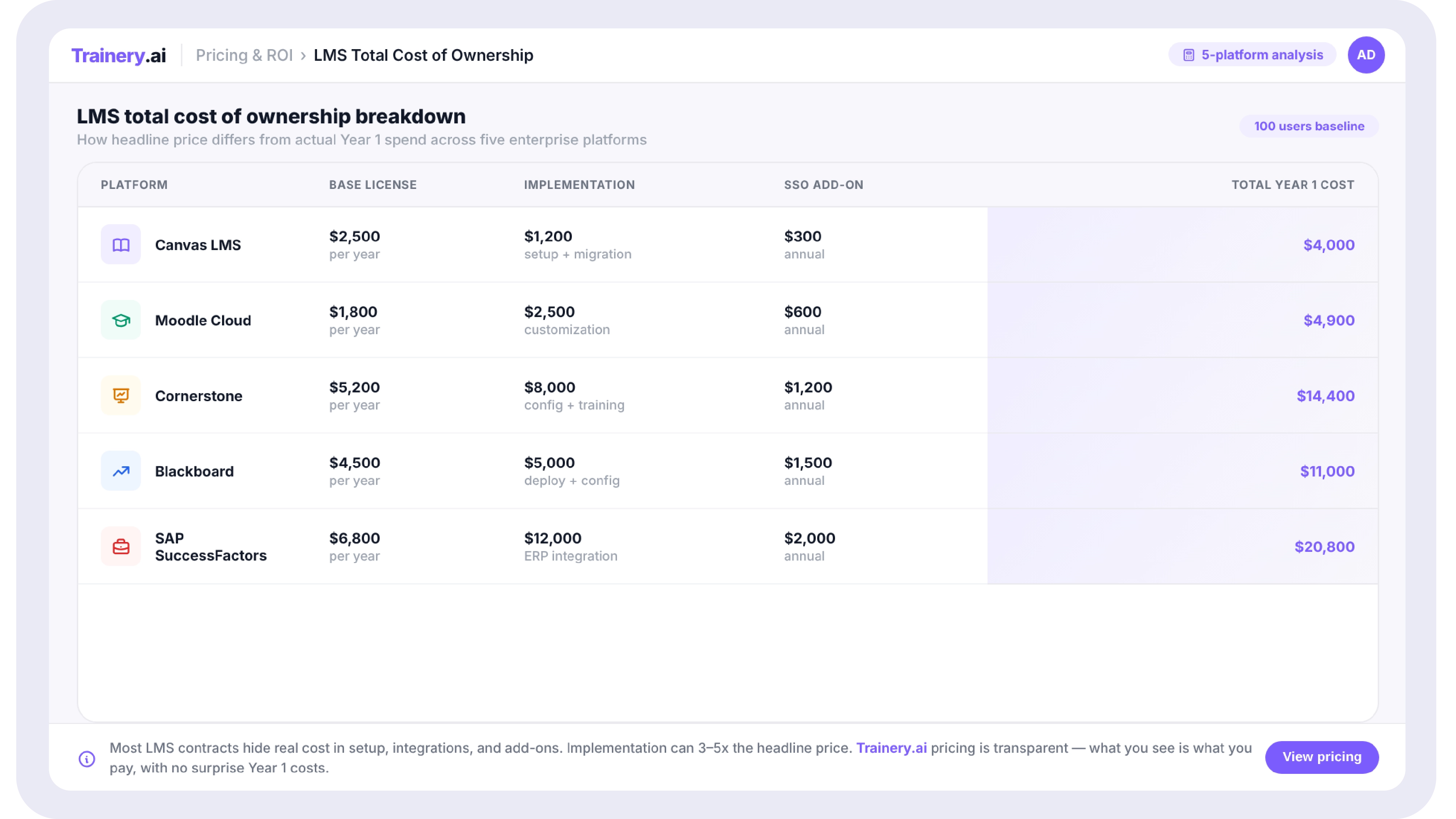
Table showing five LMS platforms with base license cost, implementation fee, SSO add-on, and total Year 1 cost columns to illustrate how headline price differs from actual spend

05. SkyPrep Simple Deployment Without a Long Implementation Project

Starting Price: Custom quote; not publicly listed. Positioned as a mid-market platform below enterprise pricing tiers.

Who It's For: Small and mid-sized teams that want to deploy quickly without a long onboarding project and don't need deep compliance reporting or ILT operations at scale.

SkyPrep's market positioning centers on simplicity, faster setup than most enterprise platforms, a clean interface, and accessible support. It is a reasonable fit for organizations that have outgrown TalentLMS's feature limitations but don't yet need the depth of a Docebo or LearnUpon contract.

The tradeoff is that its feature set is genuinely limited for complex training operations. Reporting is functional for straightforward completion tracking but less suited to multi-department rollups or executive dashboards. ILT capabilities are basic.

Key practical capabilities:

  • Faster deployment timeline than most mid-enterprise platforms
  • The active-user pricing model doesn't pay for inactive accounts
  • Clean, accessible interface that reduces admin training time
  • Course authoring and assessment tools for basic content creation

Best for: SMBs that have outgrown TalentLMS or want something simpler than LearnUpon, without a long implementation project.

06. LearnUpon Best for Multi-Audience Training on a Transparent Tier Structure

Starting Price: Three published tiers: Essential (up to 150 users), Premium (up to 500 users), Enterprise (500+ users). Exact prices require a quote, but the tier scope is published.

Who It's For: Organizations that need to train employees, partners, and customers from one LMS, each with their own branded portal.

LearnUpon's multi-audience architecture is its clearest differentiator. Where most LMS platforms treat external learner access as a custom add-on, LearnUpon structures separate branded portals for different audiences: employees, customers, and resellers within the same platform license. For organizations that currently maintain multiple LMS instances for different audiences, consolidating to one platform generates real savings.

Its tier structure is more transparent than most in this list: the user count band for each tier is published, even if exact per-user rates require a quote. That makes budget planning more tractable than platforms that reveal no pricing information at all.

Key practical capabilities:

  • Separate branded portals for different learner audiences within a single platform
  • An integration ecosystem designed for CRM and support tools used in customer education
  • Published tier scope makes internal budget approval easier
  • Scales from mid-market through large enterprise without a platform switch

Best for: Organizations running distinct training programs for employees, partners, and customers who want to consolidate multiple LMS instances into one.

07. Docebo AI-Driven Depth at Mid-Enterprise Scale

Starting Price: Custom, tiered by active-user bands (100–500, 500–1,000, 1,000–5,000). Per-user rate decreases at higher volumes.

Who It's For: Teams that want AI-driven content recommendations, a content marketplace, and gamification as core platform features, not add-ons.

Docebo sits at the higher end of this list in terms of complexity and price, but its active-user model and the breadth of features included in the base license can produce competitive per-feature costs at mid-enterprise scale. Where other platforms charge separately for content marketplace access, gamification, or community features, Docebo includes them in its core licensing.

The ILT workflow is functional, with sessions structured within courses, but reviewers consistently note that enrollment automation at the session level requires manual workarounds, which adds admin time for organizations running high-volume instructor-led programs.

Key practical capabilities:

  • AI-powered content recommendations and learning path personalization
  • Content marketplace, gamification, and community features in the core license
  • Active-user pricing: no charge for inactive learner accounts
  • Highly customizable branding and learner experience across audience segments

Best for: Mid-enterprise teams that want a feature-rich AI LMS and don't primarily run high-volume ILT programs.

Evaluating your first LMS or planning a platform switch?

The decision isn't just about price per seat, it's about which training types you run and how many separate tools you'd need to cover them. Trainery is built for teams that run e-learning and ILT together. Bring your current setup to a demo, and we'll walk through the total cost comparison with your actual learner count.

Book a Demo

How to Evaluate LMS Total Cost of Ownership in 5 Steps

  1. Map every training type you currently run: self-paced e-learning, instructor-led sessions, virtual ILT, compliance courses, coaching programs, certifications. An LMS that doesn't natively support one of these forces you into a second tool.
  2. Determine your pricing model preference: if you have seasonal learners or high turnover, per-active-user pricing is usually more cost-effective. If your learner base is stable and growing fast, flat-rate or modular pricing may produce lower Year 3 costs.
  3. Request a full Year 1 cost estimate in writing: base license, implementation, data migration, SSO integration, API access, and your required support tier. Compare this number, not the headline price, across shortlisted vendors.
  4. Check whether the second tools are needed: if the LMS requires a separate TMS for ILT scheduling, a separate content authoring tool, or a separate credential tracking system, add those costs to the comparison.
  5. Verify scalability costs at 2x your current learner count: some pricing models produce very different results at growth. A platform that is $1,200/year today may be $6,000/year at twice the users, while a flat-rate platform stays at $2,400/year.

An affordable LMS is not the one with the lowest advertised price; it's the one that costs least across the full scope of your training operations over a three-year horizon. TalentLMS and iSpring offer the most transparent published pricing for small teams with straightforward needs. Moodle removes per-user licensing entirely for organizations with technical capacity. SkyPrep and LearnUpon serve the growing middle market. Docebo brings AI-driven depth at mid-enterprise scale.

For organizations that run both e-learning and instructor-led training, a modular platform like Trainery that combines LMS, TMS, coaching, and credentials in one license removes the most common source of hidden cost: the second tool running alongside the LMS.

The practical next step is the same regardless of which platform you're evaluating: ask for a written total cost of ownership breakdown, check whether your training types are covered natively, and compare Year 1 costs, not per-seat headline prices.

TRAINERY LMS

See What a Unified LMS + TMS Platform Costs for Your Team

Trainery combines e-learning delivery, ILT scheduling, coaching, and credential tracking in one modular platform. Bring your learner count and training mix to a demo, and we'll walk through total cost vs your current setup, no generic pitch.

Book a Demo

Key Takeaways

  • The cheapest per-user price is rarely the lowest total cost; implementation fees, SSO add-ons, and locked reporting can double what you actually pay.
  • LMS pricing models differ fundamentally: per-registered-user, per-active-user, and flat-rate plans produce very different invoices at different team sizes.
  • For teams running both e-learning and instructor-led training, a platform with a built-in Training Management System eliminates the cost of a second tool.
  • Seven platforms genuinely serve different budget situations. The right choice depends on your learner count, training types, and how fast you expect to scale.
  • Always request a total cost of ownership breakdown before signing: include setup, data migration, HRIS integration, and any support tier above the default.

A corporate L&D budget rarely has room for surprises. Yet LMS pricing is one of the most reliably surprising categories in enterprise software: a platform marketed at $3 per user per month can easily land at $18 per user once implementation, SSO, API access, and a basic support contract are factored in. Meanwhile, a platform with a higher base price and broader capabilities can cost less over three years simply because it replaces two or three point tools you were running alongside the cheaper option.

This guide cuts through that noise. It covers seven platforms that genuinely serve different budget situations in 2026, what each one actually costs where pricing is publicly available, how their pricing models work at different learner counts, and what each one does and does not include, so you can evaluate them against your real training stack, not a theoretical one.

What Is an Affordable LMS?

An affordable LMS (learning management system) is a platform that delivers an acceptable total cost of ownership for an organization's specific learner count, training mix, and growth trajectory. 'Affordable' is not a fixed price: a $3/user/month platform can cost more than a $10/user/month platform at 500+ learners if the cheaper option charges extra for SSO, reporting exports, or instructor-led session tracking. Affordable LMS evaluation should always compare the total cost based on license, implementation, integrations, and support rather than the headline per-user price alone.

How LMS Pricing Models Actually Work

Before comparing platforms, understanding the three main pricing structures prevents budget surprises:

Per Registered User

You pay for every user with an active account, regardless of whether they completed a course recently. Common in SMB-tier plans. This model penalizes organizations with seasonal learners or large inactive populations.

Per Active User

You pay only for users who logged in or completed something in a given billing period. Better for organizations with fluctuating learner activity, common in mid-market platforms. Watch for varying definitions of 'active.'

Flat Rate / Modular

A fixed fee for a defined set of capabilities, independent of user count (within a band). More predictable for fast-growing teams. Some platforms combine flat rates with modular add-ons for coaching, credentials, or TMS functionality.

The practical implication: at 200 learners, per-registered-user pricing at $4/user/month costs $800/month. At 1,000 learners, the same model costs $4,000/month. A flat-rate platform at $2,000/month for up to 1,000 users is cheaper at scale, despite appearing more expensive in a feature sheet comparison.

Side-by-side line chart comparing per-user, per-active-user, and flat-rate LMS pricing models as learner count scales from 50 to 2,000

Hidden Costs That Rarely Appear in the Headline Price

The platforms below list starting prices where available. Before finalizing any evaluation, ask every vendor for a written breakdown of the following:

  • Implementation and onboarding fees (commonly $2,000–$15,000 depending on platform complexity)
  • Data migration from your existing LMS bulk imports, SCORM content uploads, and user record transfers
  • SSO (Single Sign-On) integration is included in some platforms, a paid add-on in others, and occasionally only available on higher tiers
  • API access critical for HRIS sync; free on some platforms, gated behind enterprise tiers on others
  • Custom branding and white-labeling, which may cost extra on entry-tier plans
  • Support tier email-only is standard at most entry prices; phone and dedicated CSM support typically require upgrades.
  • ILT session management: if your team runs instructor-led training, check whether scheduling, registration, and attendance tracking are included or require a second tool

Running ILT and e-learning on two separate tools?

Most LMS platforms don't include a built-in Training Management System. Trainery combines both LMS and TMS with coaching and credentials in one modular platform, so you're not paying for a second scheduling tool alongside your LMS.

Book a Demo

The 7 Most Affordable LMS Platforms for Corporate Training (2026)

Platform Best For Starting Price Pricing Model
Trainery Teams needing LMS + TMS + credentials in one platform Custom (modular) Per module, per user
TalentLMS Small teams running simple online courses From $69/mo (up to 40 users) Tiered per registered user
Moodle Organizations willing to self-host for near-zero license cost Free (hosting/dev costs extra) Open source; host or use a partner
iSpring Learn Teams wanting an integrated authoring tool + LMS bundle From $2.82/user/mo (50 users) Per registered user
SkyPrep SMBs wanting simple deployment without long implementation Custom quote Per active user
LearnUpon Multi-audience training (employees + partners + customers) Custom (3 tiers) Tiered by user count
Docebo AI-driven LMS with content marketplace at mid-enterprise scale Custom (tiered) Per active user bands

01. Trainery Best Value for Teams That Need More Than E-Learning Delivery

Starting Price: Custom, modular start with TraineryLMS alone and add modules as needed

Who It's For: Corporate L&D teams that run e-learning and instructor-led training together, or that need credential tracking alongside course delivery, and don't want to pay for two separate platform contracts.

What makes Trainery relevant in an affordability comparison is its architecture. Most LMS platforms on this list require a separate Training Management System for ILT scheduling, a separate coaching tool, and a separate credentialing system. Those additional contracts, typically $5,000 to $30,000+ per year, depending on the tool, are invisible in a per-seat LMS comparison but very visible on the annual budget.

Trainery prices modularly: TraineryLMS, TraineryTMS, TraineryCoaching, and TraineryCredentials each license independently. An organization can start with TraineryLMS only and expand into TMS or credentials as training operations grow, without switching platforms or renegotiating a separate vendor contract.

Key practical capabilities:

  • SCORM, xAPI, and AICC content support with role-based learning paths
  • TraineryTMS is available as an add-on module for ILT scheduling, instructor assignment, and cost tracking without a separate vendor.
  • TraineryCredentials tracks license renewals and certification expiry with automated reminders.
  • TrAI provides AI-driven recommendations and manager-facing insights across all modules.
  • Extended enterprise training: employees, customers, partners, and association members from one login system

Note: Trainery requires a custom quote. It's not the right fit for a team of 50 with no ILT needs in that scenario; TalentLMS or iSpring's published entry pricing may produce a lower Year 1 cost. Trainery's value case strengthens as training complexity increases.

02. TalentLMS Lowest Entry Price, Best for Simple Online Course Delivery

Starting Price: From $69/month for up to 40 users; $149/month for up to 100 users; $279/month for up to 300 users (published pricing as of mid-2026)

Who It's For: Small teams and growing SMBs that need a quick-to-deploy LMS for online courses, with minimal ILT or compliance documentation requirements.

TalentLMS is the most common entry point in this category, and its published pricing is genuinely transparent at the SMB tier. For teams under 100 users running straightforward self-paced courses, the $149/month plan provides course delivery, basic reporting, and gamification at a price few platforms can match.

The friction appears at scale. Reviewers on G2 note that training history is overwritten when annual courses are retaken rather than preserved alongside prior records, which creates compliance documentation gaps for regulated organizations. ILT session management is basic compared to dedicated TMS tools. The platform does not publish a SOC 2 Type II security report, which creates procurement delays at enterprise IT reviews.

Key practical capabilities:

  • Published per-user pricing tiers, budget approval doesn't require a vendor call
  • SCORM and xAPI content support
  • Basic ILT session creation (without instructor capacity or cost tracking)
  • Gamification and a course catalog are available across all paid plans

Best for: Teams under 100 users with no regulated compliance requirements and no instructor-led training at scale.

03. Moodle Free License, but Total Cost Depends Entirely on Your Technical Setup

Starting Price: The software is free and open source. Managed hosting (MoodleCloud) starts at approximately $80–$120/month for small deployments; self-hosted requires server costs and development resources.

Who It's For: Organizations with in-house technical capacity, or those working with a Moodle partner, that want to avoid per-user licensing entirely.

Moodle's zero license cost makes it attractive on paper, but the total cost of ownership depends on how an organization deploys it. Self-hosting requires server infrastructure, regular updates, plugin management, and internal or contracted development support. MoodleCloud removes the hosting burden but brings its own pricing and feature limitations compared to self-hosted.

For organizations with technical resources or an existing Moodle partner relationship, it can be genuinely low-cost at scale. For organizations without those resources, the savings on licensing often get consumed by implementation and maintenance.

Key practical capabilities:

  • No per-user license cost does not scale with headcount
  • Highly customizable via plugins and custom development
  • Strong community documentation and support ecosystem
  • Extensive integration options for HRIS and third-party tools via plugins

Best for: Organizations with IT or development resources, or established Moodle partner relationships, that need to scale without per-seat costs.

04. iSpring Learn Strong Authoring-Plus-LMS Bundle at a Competitive Per-User Price

Starting Price: Approximately $2.82/user/month at 50 users; pricing decreases with higher user counts. Includes the iSpring Suite authoring tool in some bundles.

Who It's For: Teams that need to create custom course content internally and deliver it through an LMS, without paying for a separate authoring tool.

iSpring's pricing is one of the most transparent in this category. The per-user rate at small user counts is published and verifiable. Its primary differentiator is the bundled authoring toolset (iSpring Suite), which allows course creation in a PowerPoint-native environment without a separate Articulate or Adobe Captivate license.

The platform is less suited to organizations that run significant ILT, need advanced compliance reporting, or are extending training to customers and partners. Reporting is functional, but reviewers note limitations for organizations needing complex multi-department or multi-role reporting structures.

Key practical capabilities:

  • Per-user pricing starting below $3/user/month for smaller teams
  • Integrated course authoring tool reduces the need for a separate content creation license
  • Mobile-ready delivery
  • Quiz and assessment builder built into the authoring environment

Best for: Teams that create most of their own course content internally and want a single vendor for both authoring and delivery at a transparent price.

Table showing five LMS platforms with base license cost, implementation fee, SSO add-on, and total Year 1 cost columns to illustrate how headline price differs from actual spend

05. SkyPrep Simple Deployment Without a Long Implementation Project

Starting Price: Custom quote; not publicly listed. Positioned as a mid-market platform below enterprise pricing tiers.

Who It's For: Small and mid-sized teams that want to deploy quickly without a long onboarding project and don't need deep compliance reporting or ILT operations at scale.

SkyPrep's market positioning centers on simplicity, faster setup than most enterprise platforms, a clean interface, and accessible support. It is a reasonable fit for organizations that have outgrown TalentLMS's feature limitations but don't yet need the depth of a Docebo or LearnUpon contract.

The tradeoff is that its feature set is genuinely limited for complex training operations. Reporting is functional for straightforward completion tracking but less suited to multi-department rollups or executive dashboards. ILT capabilities are basic.

Key practical capabilities:

  • Faster deployment timeline than most mid-enterprise platforms
  • The active-user pricing model doesn't pay for inactive accounts
  • Clean, accessible interface that reduces admin training time
  • Course authoring and assessment tools for basic content creation

Best for: SMBs that have outgrown TalentLMS or want something simpler than LearnUpon, without a long implementation project.

06. LearnUpon Best for Multi-Audience Training on a Transparent Tier Structure

Starting Price: Three published tiers: Essential (up to 150 users), Premium (up to 500 users), Enterprise (500+ users). Exact prices require a quote, but the tier scope is published.

Who It's For: Organizations that need to train employees, partners, and customers from one LMS, each with their own branded portal.

LearnUpon's multi-audience architecture is its clearest differentiator. Where most LMS platforms treat external learner access as a custom add-on, LearnUpon structures separate branded portals for different audiences: employees, customers, and resellers within the same platform license. For organizations that currently maintain multiple LMS instances for different audiences, consolidating to one platform generates real savings.

Its tier structure is more transparent than most in this list: the user count band for each tier is published, even if exact per-user rates require a quote. That makes budget planning more tractable than platforms that reveal no pricing information at all.

Key practical capabilities:

  • Separate branded portals for different learner audiences within a single platform
  • An integration ecosystem designed for CRM and support tools used in customer education
  • Published tier scope makes internal budget approval easier
  • Scales from mid-market through large enterprise without a platform switch

Best for: Organizations running distinct training programs for employees, partners, and customers who want to consolidate multiple LMS instances into one.

07. Docebo AI-Driven Depth at Mid-Enterprise Scale

Starting Price: Custom, tiered by active-user bands (100–500, 500–1,000, 1,000–5,000). Per-user rate decreases at higher volumes.

Who It's For: Teams that want AI-driven content recommendations, a content marketplace, and gamification as core platform features, not add-ons.

Docebo sits at the higher end of this list in terms of complexity and price, but its active-user model and the breadth of features included in the base license can produce competitive per-feature costs at mid-enterprise scale. Where other platforms charge separately for content marketplace access, gamification, or community features, Docebo includes them in its core licensing.

The ILT workflow is functional, with sessions structured within courses, but reviewers consistently note that enrollment automation at the session level requires manual workarounds, which adds admin time for organizations running high-volume instructor-led programs.

Key practical capabilities:

  • AI-powered content recommendations and learning path personalization
  • Content marketplace, gamification, and community features in the core license
  • Active-user pricing: no charge for inactive learner accounts
  • Highly customizable branding and learner experience across audience segments

Best for: Mid-enterprise teams that want a feature-rich AI LMS and don't primarily run high-volume ILT programs.

Evaluating your first LMS or planning a platform switch?

The decision isn't just about price per seat, it's about which training types you run and how many separate tools you'd need to cover them. Trainery is built for teams that run e-learning and ILT together. Bring your current setup to a demo, and we'll walk through the total cost comparison with your actual learner count.

Book a Demo

How to Evaluate LMS Total Cost of Ownership in 5 Steps

  1. Map every training type you currently run: self-paced e-learning, instructor-led sessions, virtual ILT, compliance courses, coaching programs, certifications. An LMS that doesn't natively support one of these forces you into a second tool.
  2. Determine your pricing model preference: if you have seasonal learners or high turnover, per-active-user pricing is usually more cost-effective. If your learner base is stable and growing fast, flat-rate or modular pricing may produce lower Year 3 costs.
  3. Request a full Year 1 cost estimate in writing: base license, implementation, data migration, SSO integration, API access, and your required support tier. Compare this number, not the headline price, across shortlisted vendors.
  4. Check whether the second tools are needed: if the LMS requires a separate TMS for ILT scheduling, a separate content authoring tool, or a separate credential tracking system, add those costs to the comparison.
  5. Verify scalability costs at 2x your current learner count: some pricing models produce very different results at growth. A platform that is $1,200/year today may be $6,000/year at twice the users, while a flat-rate platform stays at $2,400/year.

An affordable LMS is not the one with the lowest advertised price; it's the one that costs least across the full scope of your training operations over a three-year horizon. TalentLMS and iSpring offer the most transparent published pricing for small teams with straightforward needs. Moodle removes per-user licensing entirely for organizations with technical capacity. SkyPrep and LearnUpon serve the growing middle market. Docebo brings AI-driven depth at mid-enterprise scale.

For organizations that run both e-learning and instructor-led training, a modular platform like Trainery that combines LMS, TMS, coaching, and credentials in one license removes the most common source of hidden cost: the second tool running alongside the LMS.

The practical next step is the same regardless of which platform you're evaluating: ask for a written total cost of ownership breakdown, check whether your training types are covered natively, and compare Year 1 costs, not per-seat headline prices.

TRAINERY LMS

See What a Unified LMS + TMS Platform Costs for Your Team

Trainery combines e-learning delivery, ILT scheduling, coaching, and credential tracking in one modular platform. Bring your learner count and training mix to a demo, and we'll walk through total cost vs your current setup, no generic pitch.

Book a Demo

Frequently Asked Questions

Related blogs

Affordable LMS Platforms
This is some text inside of a div block.

7 Most Affordable LMS Platforms for Corporate Training (2026)

View Blog
Learning Management System Examples: 10 Real-World Use Cases by Industry and Team
This is some text inside of a div block.

Learning Management System Examples: 10 Real-World Use Cases by Industry and Team

View Blog
This is some text inside of a div block.

From Spreadsheets to Systems: How to Build a Training Operations Function That Scales

View Blog