
Extended Enterprise LMS: How to Train Employees, Customers, and Partners From One Platform

An extended enterprise LMS is a learning platform built to deliver training to audiences beyond your own workforce: customers, resellers, franchisees, and certification candidates alongside employee training, without requiring separate systems or separate logins for each audience. The defining capability is audience separation within a single platform: each group sees only the content, branding, and reporting relevant to them, while L&D manages everything from one admin console.

Updated On:
June 16, 2026
Mahesh Kumar
Founder, TraineryHCM.com
Extended Enterprise LMS

Table of Contents

If your organisation has ever had a conversation that went something like "we need a place for partners to do their certification training, but it can't look like our internal LMS, and we definitely can't give them access to our employee content", you've already run into the problem that extended enterprise training solves.

Most LMS platforms are built around a single, fairly homogeneous audience: your employees. They share a company domain, are provisioned through your HRIS, and see broadly the same content regardless of department. The moment you need to train someone who isn't an employee, a customer learning to use your product, a reseller who needs to be certified before they can sell it, a franchisee who needs to run your operating procedures correctly that single-audience assumption starts to break down.

This guide explains what an extended enterprise LMS is, who needs one, what operational changes occur when you add external audiences to your training platform, and how to evaluate whether your current LMS can do this or was never built to.

What Extended Enterprise Actually Means

The term gets used loosely, so it helps to be precise. Extended enterprise training refers to any structured learning programme delivered to people outside your direct employment but who still need to learn from your organisation in order for your business relationship with them to work.

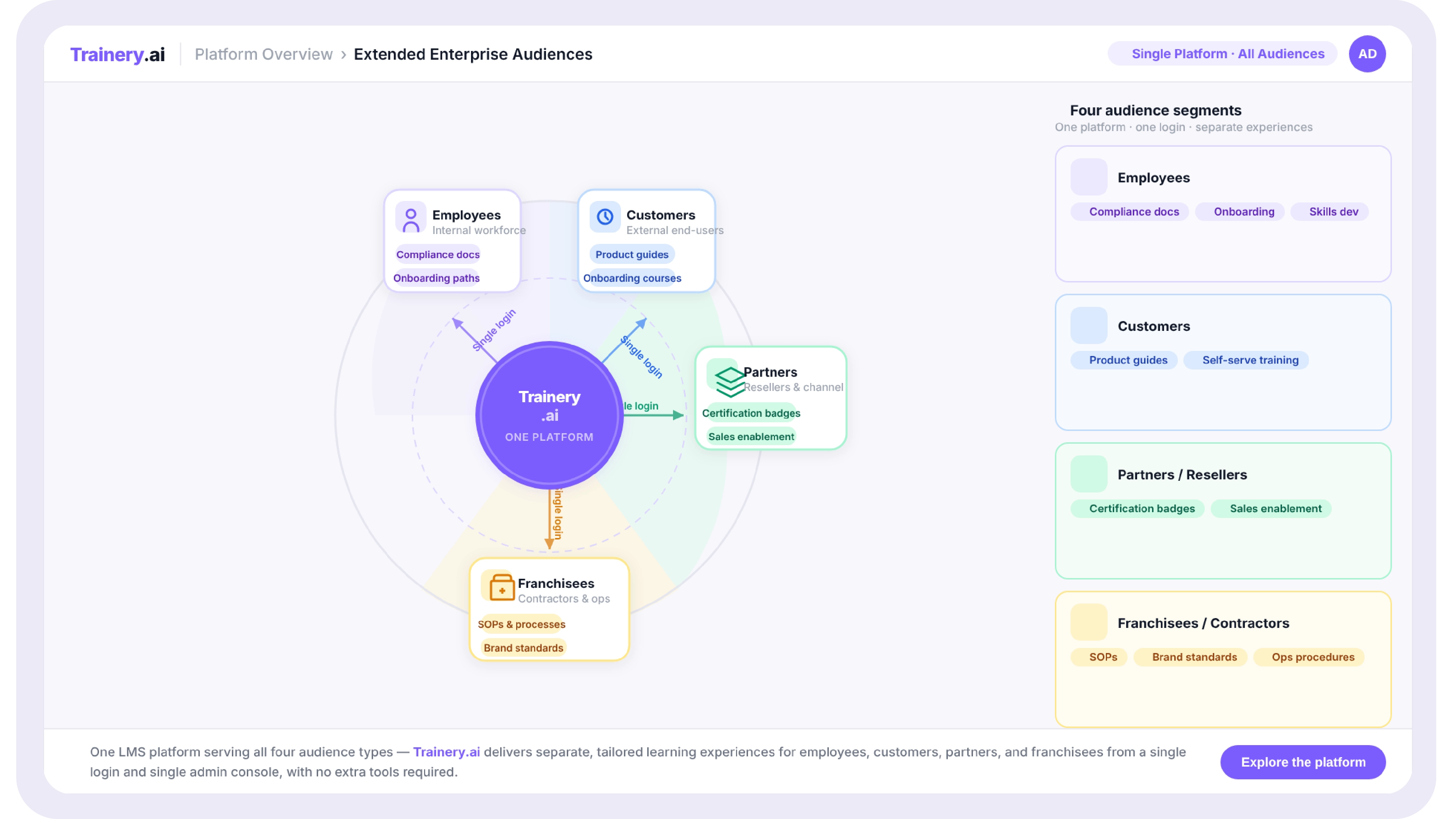
In practice, this covers four distinct audience types, each with a different relationship to your business:

  • Customers learning how to use your product or service, often tied to onboarding, adoption, or certification programmes that reduce support load and improve retention.
  • Channel partners and resellers are learning your product, your sales process, and your positioning well enough to represent you credibly to their own customers.
  • Franchisees and licensees are learning your operating procedures, brand standards, and compliance requirements so that every location delivers a consistent experience.
  • Independent contractors and gig workers are learning safety procedures, platform usage, or service standards without being on your payroll or in your HRIS.

What unites all four is that none of these people is an "employee" in the sense your LMS probably assumes. They don't have a company email address in your domain. They're not in your HRIS. Their manager, if they have one, doesn't work for you. And yet they need structured, trackable, often certifiable training from your organisation.

What Changes When Your LMS Has to Serve More Than One Audience

A standard LMS configuration assumes a relatively simple permission model: employees, grouped by role and department, all of whom can be trusted with broadly similar levels of access to the platform's content library and each other's data. Extended enterprise training breaks every part of that assumption.

Audience separation and branding

A customer logging in to complete a product certification course should not see your internal compliance training, your employee handbook, or, critically, any other customer's data. They may also expect to see your brand, not a generic "powered by [LMS vendor]" interface. This requires the platform to support genuinely separate portals or audience views from a single content and user database, not just a permissions filter bolted onto an employee-first design.

User provisioning without an HRIS

Employee LMS provisioning typically flows from the HRIS: someone joins, their record appears, and role-based assignments fire automatically. External audiences have no equivalent system of record. A reseller's sales team changes membership without your HR system ever knowing. A franchisee hires a new store manager who needs onboarding training before they touch your point-of-sale system. The platform needs self-registration, invitation-based enrolment, or integration with the systems that track these relationships, typically a CRM or partner relationship management tool, not an HRIS.

Certification that means something to a third party

Employee training completions are usually consumed internally; a manager sees a dashboard, and a compliance report gets filed. External certifications often need to be verifiable by someone outside your organisation entirely. A customer's manager may need proof that their team completed your certification programme. A franchise inspector may need to confirm that store staff hold current safety certifications. This requires certificates that can stand alone with verification, expiry dates, and credential records, which is part of why credential tracking and extended enterprise training are so often discussed together.

Reporting that answers a different question

Internal training reporting usually answers, "Aaudiences atre our people compliant and developing?" External training reporting often answers a commercial question: "Which accounts have completed onboarding, and does that correlate with retention or expansion?" or "Which partners are certified to sell which products?" The data structure underneath needs to support both connecting training completion to account or partner records, not just to an employee's HR profile.

See how extended enterprise training works in Trainery

TraineryOPS is built to manage employee, customer, and partner training from a single connected platform without separate logins, separate vendors, or separate reporting.

Book a Demo

Why Most LMS Platforms Struggle Here

The honest answer is that most LMS platforms were designed for the employee use case first, and extended enterprise capability was added later, often as a higher-tier add-on with its own licensing, its own configuration model, and its own learning curve. This shows up in a few predictable ways.

Some platforms handle multi-audience training by creating entirely separate instances, effectively a second LMS for external audiences that happens to share a vendor relationship. This solves the branding and separation problem but reintroduces the fragmentation problem: two systems, two reporting views, two places to maintain content, and no unified picture of how a piece of content performs across audiences.

Other platforms handle it through permission groups within a single instance, which solves the data fragmentation problem but often struggles with branding (external users may still see internal navigation, terminology, or design language that makes it obvious they're in "the company's internal system") and with the self-registration and CRM-integration patterns that external audiences need.

A pattern worth checking for

Ask any LMS vendor demonstrating extended enterprise capability to show you the actual admin experience of managing content for three different audiences at once are not three separate demos of three separate portals, but one admin session where you assign a course to an internal team, a partner segment, and a customer segment, and then pull a single report that shows completion across all three. If that workflow requires switching between different admin interfaces or exporting from multiple places, the "extended enterprise" capability is closer to a relabelled second product than a genuinely unified platform.

Common Extended Enterprise Training Programmes and What They Actually Require

Programme Type Primary Audience Core Platform Requirement
Customer onboarding and adoption New customers, post-sale Self-registration tied to account creation; progress visible to customer success teams
Product certification Customers, partners Assessments with pass marks; verifiable certificates with expiry and renewal
Channel partner enablement Resellers, distributors Branded partner portal; content gated by partner tier or product line
Franchisee operations training Franchise owners and staff SOP-based content; completion tied to location compliance reporting
Contractor safety and compliance Gig workers, contractors Lightweight registration; mandatory completion before platform/site access

Looking at this table, the common thread is not the content itself; onboarding content, and certification content, and SOP content are all fairly standard instructional designs. The common thread is that every one of these programmes needs the platform to handle an audience that doesn't fit the employee model, while still connecting back to the same content library, the same reporting infrastructure, and ideally the same team managing it.

How to Decide If You Need Extended Enterprise Capability

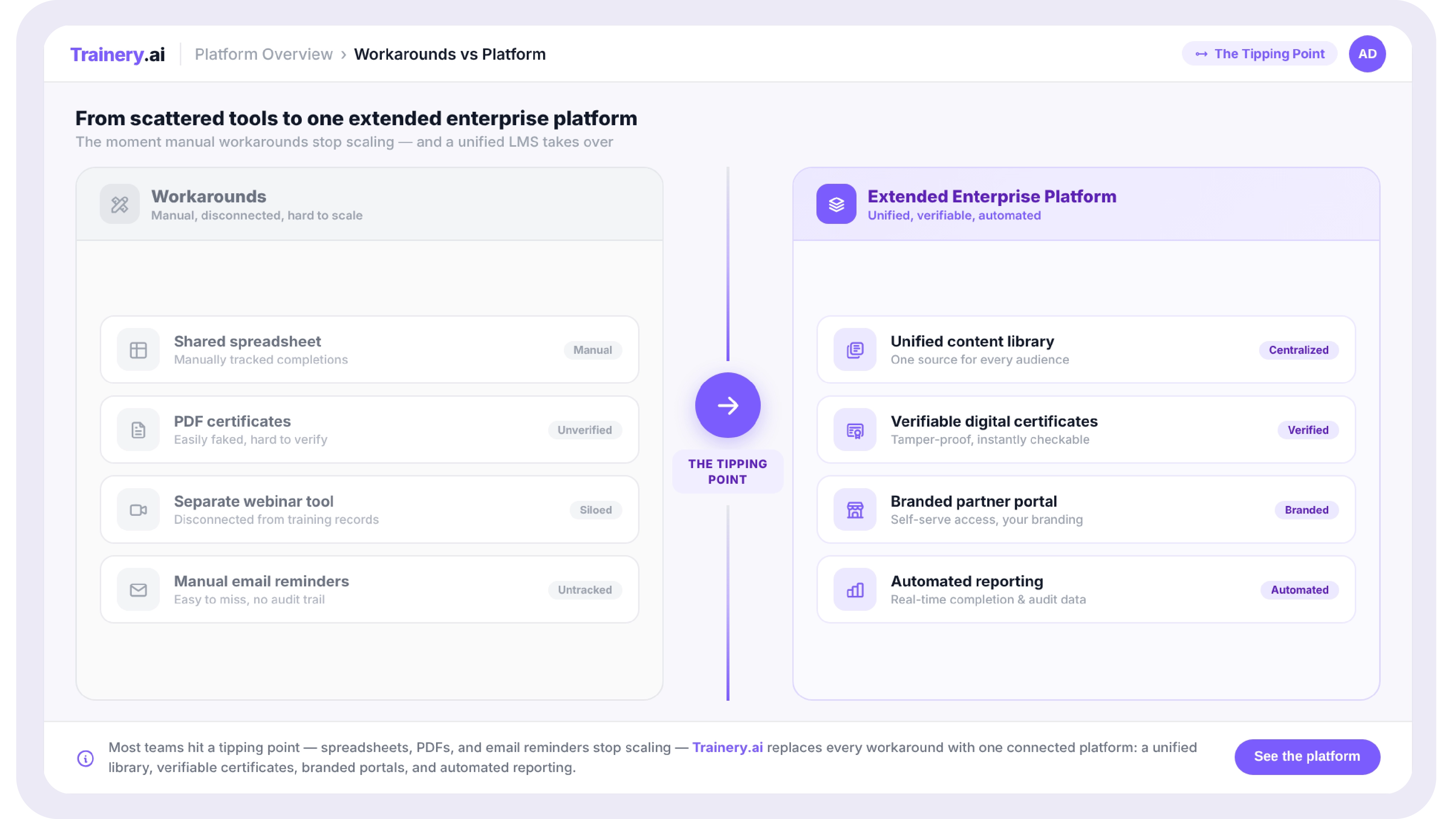
Not every organisation training external audiences needs a dedicated extended enterprise platform on day one. The decision point tends to arrive at a specific moment: when the volume or complexity of external training outgrows what can be managed through workarounds, shared documents, generic webinar recordings, or a second, disconnected tool purchased just for this purpose.

A few signals that the workaround stage is ending:

  • You're maintaining the same piece of training content in two places, once for employees, once for an external audience, because your current platform can't serve both from one source.
  • Partner or customer certifications exist as PDFs or spreadsheets rather than as verifiable, trackable records.
  • Your team can't answer "how many of our partners are currently certified on product X" without manual cross-referencing.
  • External users are asking for things your platform genuinely can't do: their own branding, their own admin view of their team's progress, integration with their own systems.

If two or more of these are true, the conversation has moved from "can we make our current setup work" to "what would a platform built for this actually look like." That's the point at which evaluating extended enterprise capability rather than continuing to patch an employee-first LMS becomes worth the time.
What This Looks Like in Practice on TraineryOPS

TraineryOPS is a part of the Trainery platform built specifically for this. The same content library that powers your employee training in TraineryLMS can be assigned to customer, partner, or franchisee audiences, each with their own branded portal view, their own registration flow, and their own reporting segment.

Certification programmes built for partners or customers connect to TraineryCredentials for expiry tracking and verifiable records, so when a partner's certification lapses, both your team and the partner know, automatically, without anyone checking a spreadsheet.

And because it's one platform rather than a second system bolted on, the reporting question that usually requires a manual export "show me completion across employees, this partner segment, and this customer cohort, in one view" is just a filter, not a project.

Employee, Customer & Partner Training — One Platform

Stop Managing Three Training Audiences Across Separate Systems

See what it looks like to bring employee, customer, and partner training into one platform.

Book a Demo →

Key Takeaways: Extended Enterprise LMS

  • Extended enterprise training means delivering structured, trackable learning to audiences outside your employment: customers, partners, franchisees, and contractors alongside your internal training.
  • The core platform requirements are audience separation (branding, content visibility), provisioning without relying on an HRIS, verifiable certification, and reporting that connects training to commercial outcomes.
  • Many LMS platforms handle this by creating a second, separate instance, which solves separation but reintroduces fragmentation. The better test is whether one admin session can manage all audiences and produce one unified report.
  • The decision point for investing in dedicated extended enterprise capability usually arrives when content duplication, untracked certifications, or unanswerable reporting questions become a recurring operational cost.

If your organisation has ever had a conversation that went something like "we need a place for partners to do their certification training, but it can't look like our internal LMS, and we definitely can't give them access to our employee content", you've already run into the problem that extended enterprise training solves.

Most LMS platforms are built around a single, fairly homogeneous audience: your employees. They share a company domain, are provisioned through your HRIS, and see broadly the same content regardless of department. The moment you need to train someone who isn't an employee, a customer learning to use your product, a reseller who needs to be certified before they can sell it, a franchisee who needs to run your operating procedures correctly that single-audience assumption starts to break down.

This guide explains what an extended enterprise LMS is, who needs one, what operational changes occur when you add external audiences to your training platform, and how to evaluate whether your current LMS can do this or was never built to.

What Extended Enterprise Actually Means

The term gets used loosely, so it helps to be precise. Extended enterprise training refers to any structured learning programme delivered to people outside your direct employment but who still need to learn from your organisation in order for your business relationship with them to work.

In practice, this covers four distinct audience types, each with a different relationship to your business:

  • Customers learning how to use your product or service, often tied to onboarding, adoption, or certification programmes that reduce support load and improve retention.
  • Channel partners and resellers are learning your product, your sales process, and your positioning well enough to represent you credibly to their own customers.
  • Franchisees and licensees are learning your operating procedures, brand standards, and compliance requirements so that every location delivers a consistent experience.
  • Independent contractors and gig workers are learning safety procedures, platform usage, or service standards without being on your payroll or in your HRIS.

What unites all four is that none of these people is an "employee" in the sense your LMS probably assumes. They don't have a company email address in your domain. They're not in your HRIS. Their manager, if they have one, doesn't work for you. And yet they need structured, trackable, often certifiable training from your organisation.

What Changes When Your LMS Has to Serve More Than One Audience

A standard LMS configuration assumes a relatively simple permission model: employees, grouped by role and department, all of whom can be trusted with broadly similar levels of access to the platform's content library and each other's data. Extended enterprise training breaks every part of that assumption.

Audience separation and branding

A customer logging in to complete a product certification course should not see your internal compliance training, your employee handbook, or, critically, any other customer's data. They may also expect to see your brand, not a generic "powered by [LMS vendor]" interface. This requires the platform to support genuinely separate portals or audience views from a single content and user database, not just a permissions filter bolted onto an employee-first design.

User provisioning without an HRIS

Employee LMS provisioning typically flows from the HRIS: someone joins, their record appears, and role-based assignments fire automatically. External audiences have no equivalent system of record. A reseller's sales team changes membership without your HR system ever knowing. A franchisee hires a new store manager who needs onboarding training before they touch your point-of-sale system. The platform needs self-registration, invitation-based enrolment, or integration with the systems that track these relationships, typically a CRM or partner relationship management tool, not an HRIS.

Certification that means something to a third party

Employee training completions are usually consumed internally; a manager sees a dashboard, and a compliance report gets filed. External certifications often need to be verifiable by someone outside your organisation entirely. A customer's manager may need proof that their team completed your certification programme. A franchise inspector may need to confirm that store staff hold current safety certifications. This requires certificates that can stand alone with verification, expiry dates, and credential records, which is part of why credential tracking and extended enterprise training are so often discussed together.

Reporting that answers a different question

Internal training reporting usually answers, "Aaudiences atre our people compliant and developing?" External training reporting often answers a commercial question: "Which accounts have completed onboarding, and does that correlate with retention or expansion?" or "Which partners are certified to sell which products?" The data structure underneath needs to support both connecting training completion to account or partner records, not just to an employee's HR profile.

See how extended enterprise training works in Trainery

TraineryOPS is built to manage employee, customer, and partner training from a single connected platform without separate logins, separate vendors, or separate reporting.

Book a Demo

Why Most LMS Platforms Struggle Here

The honest answer is that most LMS platforms were designed for the employee use case first, and extended enterprise capability was added later, often as a higher-tier add-on with its own licensing, its own configuration model, and its own learning curve. This shows up in a few predictable ways.

Some platforms handle multi-audience training by creating entirely separate instances, effectively a second LMS for external audiences that happens to share a vendor relationship. This solves the branding and separation problem but reintroduces the fragmentation problem: two systems, two reporting views, two places to maintain content, and no unified picture of how a piece of content performs across audiences.

Other platforms handle it through permission groups within a single instance, which solves the data fragmentation problem but often struggles with branding (external users may still see internal navigation, terminology, or design language that makes it obvious they're in "the company's internal system") and with the self-registration and CRM-integration patterns that external audiences need.

A pattern worth checking for

Ask any LMS vendor demonstrating extended enterprise capability to show you the actual admin experience of managing content for three different audiences at once are not three separate demos of three separate portals, but one admin session where you assign a course to an internal team, a partner segment, and a customer segment, and then pull a single report that shows completion across all three. If that workflow requires switching between different admin interfaces or exporting from multiple places, the "extended enterprise" capability is closer to a relabelled second product than a genuinely unified platform.

Common Extended Enterprise Training Programmes and What They Actually Require

Programme Type Primary Audience Core Platform Requirement
Customer onboarding and adoption New customers, post-sale Self-registration tied to account creation; progress visible to customer success teams
Product certification Customers, partners Assessments with pass marks; verifiable certificates with expiry and renewal
Channel partner enablement Resellers, distributors Branded partner portal; content gated by partner tier or product line
Franchisee operations training Franchise owners and staff SOP-based content; completion tied to location compliance reporting
Contractor safety and compliance Gig workers, contractors Lightweight registration; mandatory completion before platform/site access

Looking at this table, the common thread is not the content itself; onboarding content, and certification content, and SOP content are all fairly standard instructional designs. The common thread is that every one of these programmes needs the platform to handle an audience that doesn't fit the employee model, while still connecting back to the same content library, the same reporting infrastructure, and ideally the same team managing it.

How to Decide If You Need Extended Enterprise Capability

Not every organisation training external audiences needs a dedicated extended enterprise platform on day one. The decision point tends to arrive at a specific moment: when the volume or complexity of external training outgrows what can be managed through workarounds, shared documents, generic webinar recordings, or a second, disconnected tool purchased just for this purpose.

A few signals that the workaround stage is ending:

  • You're maintaining the same piece of training content in two places, once for employees, once for an external audience, because your current platform can't serve both from one source.
  • Partner or customer certifications exist as PDFs or spreadsheets rather than as verifiable, trackable records.
  • Your team can't answer "how many of our partners are currently certified on product X" without manual cross-referencing.
  • External users are asking for things your platform genuinely can't do: their own branding, their own admin view of their team's progress, integration with their own systems.

If two or more of these are true, the conversation has moved from "can we make our current setup work" to "what would a platform built for this actually look like." That's the point at which evaluating extended enterprise capability rather than continuing to patch an employee-first LMS becomes worth the time.

What This Looks Like in Practice on TraineryOPS

TraineryOPS is a part of the Trainery platform built specifically for this. The same content library that powers your employee training in TraineryLMS can be assigned to customer, partner, or franchisee audiences, each with their own branded portal view, their own registration flow, and their own reporting segment.

Certification programmes built for partners or customers connect to TraineryCredentials for expiry tracking and verifiable records, so when a partner's certification lapses, both your team and the partner know, automatically, without anyone checking a spreadsheet.

And because it's one platform rather than a second system bolted on, the reporting question that usually requires a manual export "show me completion across employees, this partner segment, and this customer cohort, in one view" is just a filter, not a project.

Employee, Customer & Partner Training — One Platform

Stop Managing Three Training Audiences Across Separate Systems

See what it looks like to bring employee, customer, and partner training into one platform.

Book a Demo →

Frequently Asked Questions

Related blogs

Learning Management System Examples: 10 Real-World Use Cases by Industry and Team
This is some text inside of a div block.

Learning Management System Examples: 10 Real-World Use Cases by Industry and Team

View Blog
This is some text inside of a div block.

From Spreadsheets to Systems: How to Build a Training Operations Function That Scales

View Blog
This is some text inside of a div block.

How Healthcare Organizations Can Simplify Compliance Training Management

View Blog