

.svg)

Here's a scenario that plays out in a lot of procurement processes: L&D finds an LMS they like. The demo goes well, the pricing works, and the content library fits the need. Then the deal goes to IT or security for sign-off and stalls, sometimes for weeks, sometimes permanently, over questions L&D didn't know they needed to ask.
This isn't IT being difficult. An LMS holds employee data: names, roles, sometimes performance and compliance records, and increasingly sits behind single sign-on alongside every other system in the company. From a security standpoint, it's not a "training tool"; it's another system with access to identity and data, and it gets evaluated accordingly.
The good news is that the questions security teams ask follow a fairly predictable pattern, and L&D buyers who know what those questions are and ask them during the demo, not after the contract is drafted, avoid the stalled-deal scenario entirely. This checklist covers that pattern.
1. Security Documentation: What to Ask For
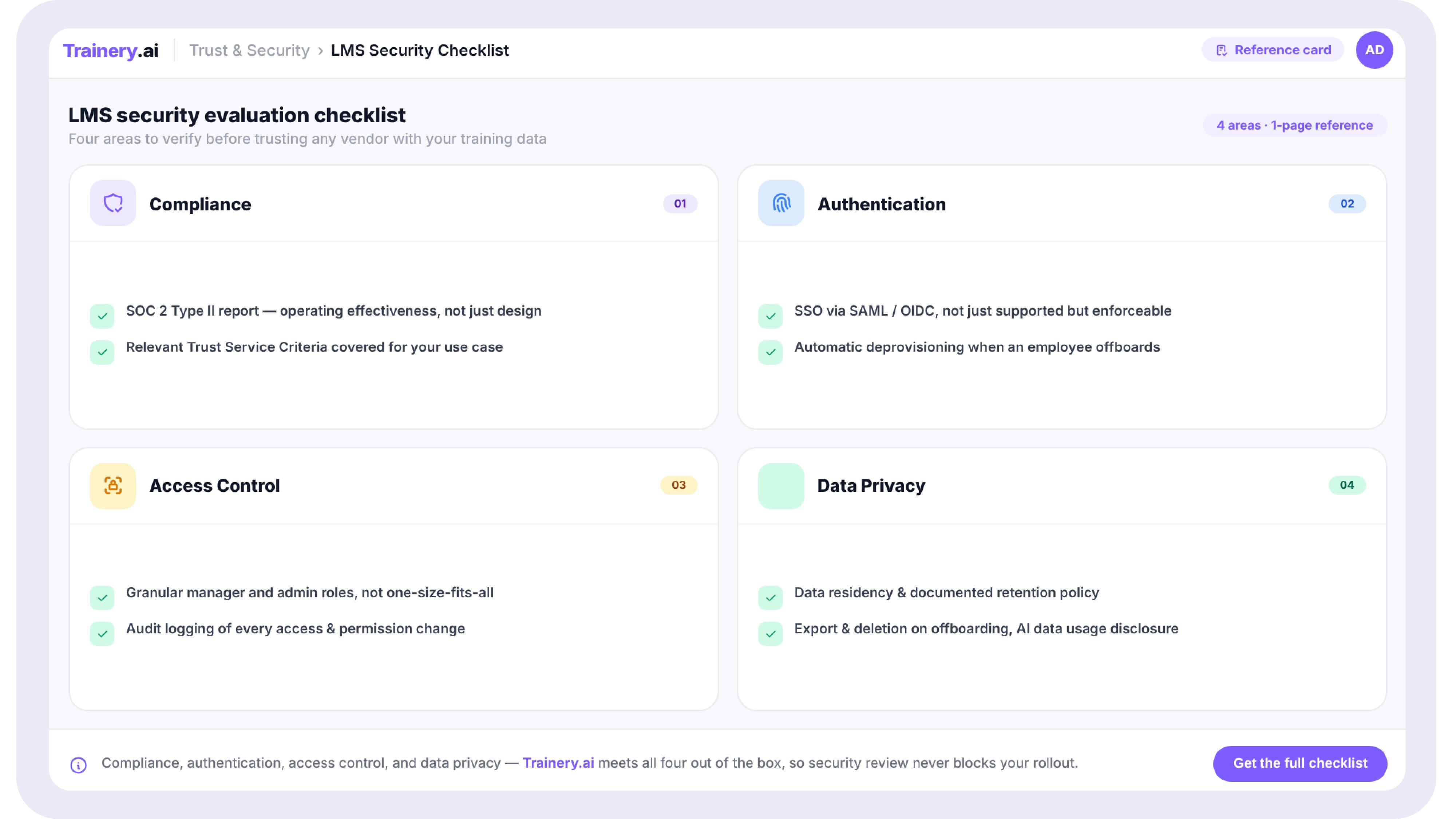
Security reviews often start with a simple question: what evidence can the vendor provide about how its controls are designed, operated, and reviewed? Rather than relying on a badge or a broad compliance claim, ask for current documentation that explains the controls relevant to your environment.
Useful evidence can include a security overview, architecture documentation, encryption and access-control details, incident-response procedures, vulnerability-management practices, penetration-test summaries, data-processing terms, and independent assessment reports when available. The exact documentation will vary by vendor, and not every vendor will have the same external attestations or certifications.
The key is to match the evidence to your own risk requirements. A regulated organization may need deeper documentation than a smaller buyer. Security, privacy, availability, access management, and business-continuity controls should be evaluated separately rather than treated as one pass/fail checkbox.
What to actually ask for
Ask the vendor for the security documentation they can share during due diligence, ideally under NDA if needed. Confirm what is current, what is independently assessed, which controls are in scope, when the evidence was last updated, and whether any exceptions or remediation items are open. If a vendor can only provide broad marketing language, ask your IT or security team what additional proof they require before approval.
2. Authentication: SSO and Why It's Not Optional Above a Certain Size
Single sign-on (SSO), typically via SAML or OIDC, allows users to access the LMS using the same credentials and authentication flow as the rest of your enterprise systems, managed through your identity provider (Okta, Azure AD/Entra, Google Workspace, and similar).
Below a certain organization size, "we'll just create separate logins" feels manageable. Above it, separate logins for any system become a security liability for reasons that have nothing to do with the LMS itself: when an employee leaves, deprovisioning needs to happen everywhere, immediately. A system outside SSO is a system that can be missed, an account that stays active after someone's departure, discovered only during a periodic access review, if at all.
The questions worth asking aren't just "do you support SSO"; most platforms claiming enterprise readiness will say yes. The more useful questions are about scope and enforcement:
- Is SSO available on your pricing tier, or is it an add-on reserved for higher tiers? (This is a common gap: SSO is sometimes gated behind enterprise pricing even when the rest of the platform is accessible on lower tiers.)
- Can SSO be enforced, meaning users cannot bypass it and log in with a separate username/password, or is it optional per-user?
- Does the platform support automatic deprovisioning when a user is removed from the identity provider, or does removal from the IdP simply block login while the account record remains?
3. Role-Based Access Control: Who Can See and Do What
RBAC (role-based access control) in an LMS context determines what different categories of users can see and modify. The baseline roles are usually learner, manager, and administrator, but the depth of control within those roles varies significantly between platforms, and this is where "enterprise-ready" claims often diverge most from reality.
The manager's visibility question
A manager's role should typically be able to see their direct reports' training status, but should they be able to see other teams' data? Should a regional manager see data for regions they don't manage? Platforms with coarse RBAC often have a binary "manager or not" distinction, which means manager-level access is either too broad (any manager sees all data) or requires manual configuration per manager, which doesn't stay accurate as org structure changes.
The admin scope question
"Administrator" is often treated as a single, all-powerful role, but in larger organizations, different administrators legitimately need different scopes. An HR administrator managing compliance training assignments shouldn't necessarily have the same access as an IT administrator managing SSO configuration and integrations. Platforms that only offer one undifferentiated "admin" role create a situation where either too many people have excessive access, or one overloaded admin becomes a bottleneck for everything.
Audit logging for access changes
Beyond who can do what, security reviews often ask whether changes to access, such as someone being granted admin rights or a permission being modified, are logged in a way that can be reviewed later. This matters for incident investigation and for periodic access reviews, which many compliance frameworks require.
SECURITY & COMPLIANCE
Trainery's security page covers SSO configuration, RBAC structure, encryption, audit logging, and data handling in detail — built for the IT, security, and procurement teams who'll be reviewing this alongside you.
4. Data Privacy: What Happens to Learner Data
Learner data in an LMS typically includes names, email addresses, role and department information (often synced from an HRIS), training history, assessment results, and sometimes performance-adjacent data if the LMS connects to skills or competency frameworks. Depending on your jurisdiction and industry, this data may be subject to specific privacy regulations, such as GDPR if you have EU-based employees, for example, regardless of where your organization is headquartered.
The practical questions worth asking go beyond "are you GDPR compliant" (almost every vendor will say yes) to more specific operational questions:
- Where is data stored, which region(s), and can this be controlled or restricted if data residency matters for your organization?
- What is the data retention policy for learner records after an employee leaves the organization? Is it deleted, retained, or does this depend on configuration?
- If you terminate the contract, what happens to your data? Is there a defined export process, and a defined deletion timeline after export?
- Does the vendor use learner data for any purpose beyond providing the service to you, for example, aggregated analytics, AI model training, or benchmarking, and is this something you can opt out of?
That last question has become more relevant as AI features become standard in LMS platforms. If a vendor's AI recommendation engine or content generation features are trained on customer data in aggregate, that's a meaningfully different data handling posture than a vendor whose AI features operate only on your own organization's data, and it's a distinction that's often not volunteered unless asked.
How to Use This Without Becoming a Security Expert Overnight
The point of this checklist isn't to turn L&D into a security function; it's to make sure the security conversation happens during evaluation, not after a contract is signed. Most of these questions can simply be sent to a vendor's sales or solutions engineering team, who should have ready answers (and documentation) for all of them. If a vendor struggles to answer questions on this list, or can only respond with marketing language rather than specifics, that's itself useful information.
A practical approach: compile the answers to these questions during the evaluation, and share them with your IT or security stakeholder before the deal reaches their desk for sign-off rather than after. This single change in sequencing is often the difference between a security review that takes a day and one that stalls a deal for a month.
Related Trainery Resources
Continue your planning with these closely related guides and platform resources:
- essential LMS features
- LMS implementation checklist
- LMS migration guide
- LMS vendor evaluation guide
- SCORM and xAPI content migration
Answer Every Security Question Before IT Asks It
Get the security details your IT team will ask for before they ask for them.
Book a Demo →

![Time to Competency: How to Measure and Reduce Employee Ramp Time [+ Template]](https://cdn.prod.website-files.com/69df883470c17d589ab1ae87/6ab7984c17faebc383cb74bc_time-to-competency.webp)
.svg)

.svg)
.svg)

