

Bringing Your Existing Course Library to a New LMS: SCORM, xAPI, and Content Migration Explained

Updated On:
June 17, 2026
Mahesh Kumar
Founder, TraineryHCM.com

Table of Contents

If you've built up a course library over several years, there's a reasonable chance it includes content exported from more than one authoring tool, built to more than one SCORM version, possibly with some content that predates SCORM entirely and was built to an older standard called AICC. None of this is unusual, and none of it is necessarily a problem, but it does mean that "will our content work on a new platform" isn't a single yes/no question. It depends on what "our content" actually is.

This guide explains what SCORM, xAPI, AICC, and cmi5 actually are, in plain terms, what tends to transfer cleanly between platforms and what tends to cause problems, and how to check your own content before committing to a platform switch rather than finding out during go-live.

The Standards, Explained Without the Acronym Soup

SCORM 1.2 and SCORM 2004: the long-standing default

SCORM is a packaging and communication standard; it defines how a course is packaged into a file (a SCORM package, usually a zip file with a specific internal structure) and how that course communicates with the LMS while a learner is taking it: reporting completion status, scores, time spent, and bookmarking progress so a learner can resume where they left off.

SCORM 1.2, released in 2001, is the older and simpler version. SCORM 2004 (which itself has several editions, most commonly 3rd and 4th editions) added more sophisticated sequencing, the ability to define rules about what order content must be completed in, prerequisite logic between modules, and more granular completion and mastery tracking.

The practical implication: SCORM 1.2 content is generally simpler and tends to be more portable between platforms, precisely because it's doing less. SCORM 2004 content with complex sequencing rules is more powerful in its original environment but more likely to behave differently, sometimes subtly, in a different LMS's player, because not every LMS implements every SCORM 2004 sequencing rule identically.

AICC: the standard before the standard

AICC (Aviation Industry CBT Committee) predates SCORM and was the standard that SCORM was largely built to replace. If your organisation has content old enough to predate roughly 2001-2004, there's a chance some of it is AICC-based rather than SCORM. AICC content uses a different communication method (HACP, via file-based or HTTP communication, rather than SCORM's JavaScript-based API) and modern LMS platforms increasingly don't support it natively, if at all. AICC content that needs to survive a platform migration usually needs to be re-exported from its source files in a SCORM format, if the source files still exist, which is itself often the bigger challenge.

xAPI (Experience API / Tin Can): tracking beyond the LMS

xAPI was designed to address a limitation of SCORM: SCORM only tracks what happens inside the LMS's course player. xAPI can track learning activities anywhere, a simulation, a mobile app, a VR experience, or even real-world activities logged manually, and sends that data as a stream of "statements" (in the format "actor verb object"; for example, "Sabesh completed Module 3") to a Learning Record Store, or LRS.

The practical implication: xAPI content is more flexible and can capture richer data, but it requires the receiving system to have an LRS either built into the LMS or as a separate connected system to actually receive and store that data. xAPI content pointed at a platform without a properly configured LRS will often appear to run fine for the learner, while silently failing to report any completion data at all, which is a particularly unpleasant way to discover a compatibility gap.

CMI5: SCORM and xAPI's middle ground

cmi5 is a more recent specification that combines SCORM's straightforward launch-and-track model with xAPI's data format. It's designed to be easier to implement consistently than SCORM 2004's sequencing rules, while still producing xAPI-format data. Adoption is growing, but is still behind SCORM 1.2 in terms of how much existing content uses it; most organisations encounter CMI5 in newer content from modern authoring tools rather than in their legacy library.
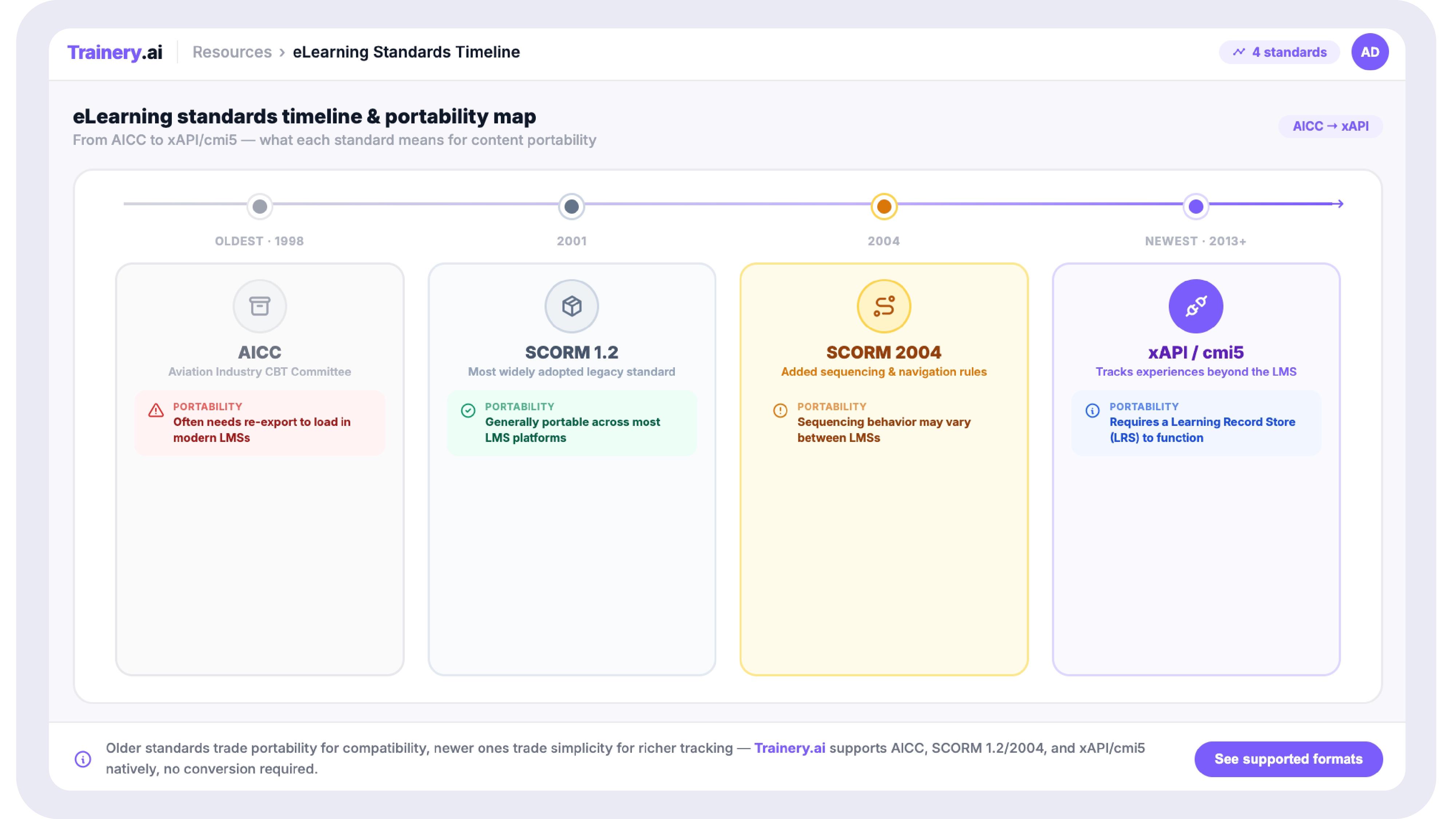
A horizontal timeline showing four standards in chronological order: AICC (oldest, left) β†’ SCORM 1.2 β†’ SCORM 2004 β†’ xAPI/cmi5 (newest, right). Below the timeline, a simple "portability" indicator for each AICC is shown with a warning icon (often needs re-export), SCORM 1.2 with a green check (generally portable), SCORM 2004 with a caution icon (sequencing may vary), xAPI/cmi5 with an info icon (requires LRS).

What Actually Breaks When Content Moves Between Platforms

"SCORM compliant" is a phrase that appears on almost every LMS's feature list, and in a narrow sense, it's usually true: most platforms can ingest a SCORM package, launch it, and record a completion. Where things go wrong is in the details that sit just below "does it launch."

Suspend data and resume behaviour.

SCORM content saves "suspend data," essentially a snapshot of where a learner left off, so they can resume later. Different authoring tools structure this data slightly differently, and different LMS players handle it with varying levels of fidelity. The common failure mode: a learner resumes a course on the new platform, and instead of picking up where they left off, the course either restarts from the beginning or, more confusingly, shows as already complete when it isn't, because the suspend data was misread.

Sequencing and navigation rules (SCORM 2004 specifically)

If your SCORM 2004 content uses sequencing, for example, "Module 2 cannot be started until Module 1 is marked complete" or "the final assessment is only available after all modules score above 80%," this logic is defined within the SCORM package itself, but it's the LMS player that has to interpret and enforce it. Not every LMS implements the full SCORM 2004 sequencing specification (which is genuinely complex), and partial implementations can result in sequencing rules being silently ignored, meaning a learner can access the final assessment without completing prerequisites, with no error, just different behaviour than the content was designed for.

Scoring and completion criteria mismatches

SCORM defines multiple related but distinct data points: completion status (incomplete/completed), success status (passed/failed), and score (often as both a raw score and a scaled score between -1 and 1). Different LMS platforms sometimes map their own "completion" definition to different combinations of these values, meaning a course that reports as "completed" in its original platform might report as "incomplete" in a new one, not because the learner did anything differently, but because the new platform is reading a different data point to determine completion.

xAPI without a matching LRS

As mentioned above, xAPI content sent to a platform without a correctly configured LRS doesn't typically produce an error; it often just produces no data. The course runs, the learner experiences it normally, and then there's simply nothing in the completion report. This is one of the more disruptive failure modes precisely because it's silent.

The single most important pre-migration step

Before committing to any platform migration, test a representative sample of your actual content, not generic sample courses that the new vendor provides in the new platform's player. "Representative" means: your oldest content, your most complex sequencing, and a sample of whatever your most-used authoring tool produces. Five to fifteen real courses, tested end-to-end, including resume behaviour, will surface the issues described above. Testing only with the vendor's demo content tells you the platform can run SCORM in general; it tells you nothing about whether it can run your SCORM.

SCORM, xAPI & CONTENT MIGRATION SUPPORT

Trainery supports SCORM 1.2, SCORM 2004, AICC (with conversion guidance), xAPI, and cmi5. Our implementation process includes testing your actual content library before go-live β€” not just generic sample files.

Book a Demo

A Practical Pre-Migration Content Audit

Before any platform decision, a content audit answers a few questions that determine how much of your migration is "just works" versus "needs attention."

Question Why It Matters
What standard(s) does our content use, and what versions? Determines baseline compatibility; SCORM 1.2 is generally lowest-risk; AICC is highest-risk.
Do we have the source files (not just the exported SCORM packages)? Source files allow re-export in a different format if needed; without them, problematic packages may need to be rebuilt from scratch.
Which courses use SCORM 2004 sequencing rules? These need explicit testing in the new player; sequencing is the area most likely to behave differently.
Do we have any xAPI content, and where does its data currently go? Confirms whether an LRS is needed in the new environment, and whether the new platform provides one or requires a separate connection.
What authoring tools were used, and are they still licensed/accesssible? If content needs rework, knowing whether you can still edit the source matters; some older authoring tools are no longer supported.
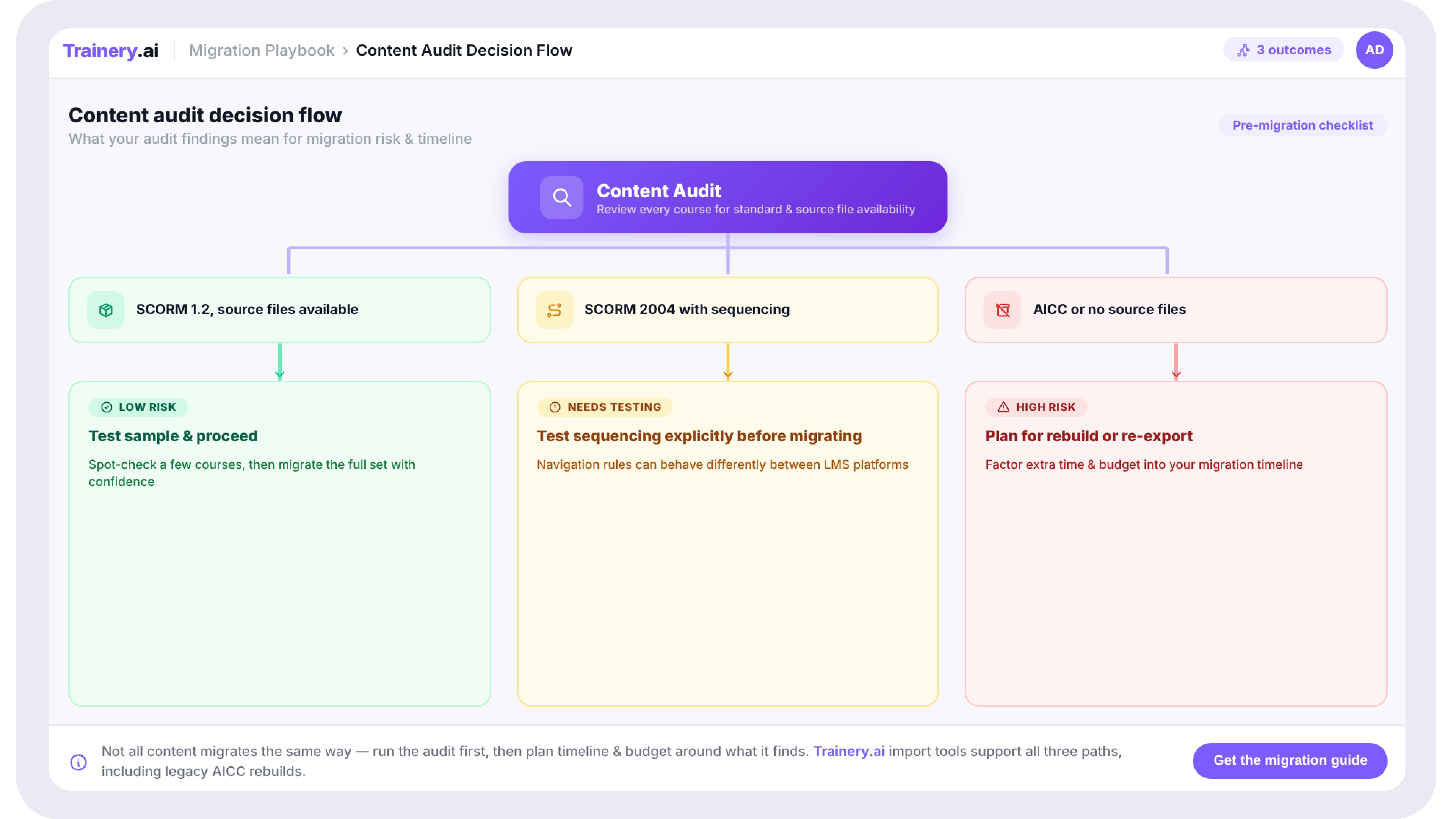
A simple flowchart starting with "Content Audit" at the top, branching into three paths based on findings: "SCORM 1.2, source files available" β†’ green path β†’ "Low risk, test sample and proceed"; "SCORM 2004 with sequencing" β†’ amber path β†’ "Test sequencing explicitly before migrating"; "AICC or no source files" β†’ red path β†’ "Plan for rebuild or re-export, factor into timeline".

What Good Compatibility Looks Like in Practice

A platform that genuinely handles your content well isn't just one that lists "SCORM 1.2, SCORM 2004, xAPI" on a features page; it's one where, during evaluation, you can upload a handful of your actual courses (including an old one and a complex one), launch them, partially complete one, close it, reopen it, and watch it resume correctly. Then complete it, and check that the completion record in the reporting matches what you'd expect from the original platform.

This is a twenty-minute test that most vendors will happily support during a trial or demo, and it's considerably more informative than any compatibility claim on a website, because it tests your content, in the new player, doing what your learners will actually do with it.

Implementation That Tests Before It Goes Live

Don't Guess Whether Your Content Will Work β€” Test It

Trainery's implementation process includes compatibility testing with your actual course library before go-live.

Book a Demo β†’

Key Takeaways: SCORM & xAPI Explained

  • SCORM 1.2 is generally the most portable content standard; SCORM 2004's sequencing rules and xAPI's reliance on an LRS are the two areas most likely to behave differently between platforms.
  • AICC content (typically pre-2004) often isn't supported by modern platforms and may need to be re-exported from source files if those files still exist.
  • The most common silent failures are: suspend data not resuming correctly, sequencing rules being ignored without error, completion criteria mapping differently, and xAPI content producing no data due to a missing or misconfigured LRS.
  • A pre-migration content audit checking standards used, source file availability, and sequencing complexity determines how much of a migration is straightforward versus needs rework.
  • The most reliable compatibility test is uploading real content (not vendor demo content) to the new platform and testing launch, resume, and completion reporting end to end.

If you've built up a course library over several years, there's a reasonable chance it includes content exported from more than one authoring tool, built to more than one SCORM version, possibly with some content that predates SCORM entirely and was built to an older standard called AICC. None of this is unusual, and none of it is necessarily a problem, but it does mean that "will our content work on a new platform" isn't a single yes/no question. It depends on what "our content" actually is.

This guide explains what SCORM, xAPI, AICC, and cmi5 actually are, in plain terms, what tends to transfer cleanly between platforms and what tends to cause problems, and how to check your own content before committing to a platform switch rather than finding out during go-live.

The Standards, Explained Without the Acronym Soup

SCORM 1.2 and SCORM 2004: the long-standing default

SCORM is a packaging and communication standard; it defines how a course is packaged into a file (a SCORM package, usually a zip file with a specific internal structure) and how that course communicates with the LMS while a learner is taking it: reporting completion status, scores, time spent, and bookmarking progress so a learner can resume where they left off.

SCORM 1.2, released in 2001, is the older and simpler version. SCORM 2004 (which itself has several editions, most commonly 3rd and 4th editions) added more sophisticated sequencing, the ability to define rules about what order content must be completed in, prerequisite logic between modules, and more granular completion and mastery tracking.

The practical implication: SCORM 1.2 content is generally simpler and tends to be more portable between platforms, precisely because it's doing less. SCORM 2004 content with complex sequencing rules is more powerful in its original environment but more likely to behave differently, sometimes subtly, in a different LMS's player, because not every LMS implements every SCORM 2004 sequencing rule identically.

AICC: the standard before the standard

AICC (Aviation Industry CBT Committee) predates SCORM and was the standard that SCORM was largely built to replace. If your organisation has content old enough to predate roughly 2001-2004, there's a chance some of it is AICC-based rather than SCORM. AICC content uses a different communication method (HACP, via file-based or HTTP communication, rather than SCORM's JavaScript-based API) and modern LMS platforms increasingly don't support it natively, if at all. AICC content that needs to survive a platform migration usually needs to be re-exported from its source files in a SCORM format, if the source files still exist, which is itself often the bigger challenge.

xAPI (Experience API / Tin Can): tracking beyond the LMS

xAPI was designed to address a limitation of SCORM: SCORM only tracks what happens inside the LMS's course player. xAPI can track learning activities anywhere, a simulation, a mobile app, a VR experience, or even real-world activities logged manually, and sends that data as a stream of "statements" (in the format "actor verb object"; for example, "Sabesh completed Module 3") to a Learning Record Store, or LRS.

The practical implication: xAPI content is more flexible and can capture richer data, but it requires the receiving system to have an LRS either built into the LMS or as a separate connected system to actually receive and store that data. xAPI content pointed at a platform without a properly configured LRS will often appear to run fine for the learner, while silently failing to report any completion data at all, which is a particularly unpleasant way to discover a compatibility gap.

CMI5: SCORM and xAPI's middle ground

cmi5 is a more recent specification that combines SCORM's straightforward launch-and-track model with xAPI's data format. It's designed to be easier to implement consistently than SCORM 2004's sequencing rules, while still producing xAPI-format data. Adoption is growing, but is still behind SCORM 1.2 in terms of how much existing content uses it; most organisations encounter CMI5 in newer content from modern authoring tools rather than in their legacy library.

A horizontal timeline showing four standards in chronological order: AICC (oldest, left) β†’ SCORM 1.2 β†’ SCORM 2004 β†’ xAPI/cmi5 (newest, right). Below the timeline, a simple "portability" indicator for each AICC is shown with a warning icon (often needs re-export), SCORM 1.2 with a green check (generally portable), SCORM 2004 with a caution icon (sequencing may vary), xAPI/cmi5 with an info icon (requires LRS).

What Actually Breaks When Content Moves Between Platforms

"SCORM compliant" is a phrase that appears on almost every LMS's feature list, and in a narrow sense, it's usually true: most platforms can ingest a SCORM package, launch it, and record a completion. Where things go wrong is in the details that sit just below "does it launch."

Suspend data and resume behaviour.

SCORM content saves "suspend data," essentially a snapshot of where a learner left off, so they can resume later. Different authoring tools structure this data slightly differently, and different LMS players handle it with varying levels of fidelity. The common failure mode: a learner resumes a course on the new platform, and instead of picking up where they left off, the course either restarts from the beginning or, more confusingly, shows as already complete when it isn't, because the suspend data was misread.

Sequencing and navigation rules (SCORM 2004 specifically)

If your SCORM 2004 content uses sequencing, for example, "Module 2 cannot be started until Module 1 is marked complete" or "the final assessment is only available after all modules score above 80%," this logic is defined within the SCORM package itself, but it's the LMS player that has to interpret and enforce it. Not every LMS implements the full SCORM 2004 sequencing specification (which is genuinely complex), and partial implementations can result in sequencing rules being silently ignored, meaning a learner can access the final assessment without completing prerequisites, with no error, just different behaviour than the content was designed for.

Scoring and completion criteria mismatches

SCORM defines multiple related but distinct data points: completion status (incomplete/completed), success status (passed/failed), and score (often as both a raw score and a scaled score between -1 and 1). Different LMS platforms sometimes map their own "completion" definition to different combinations of these values, meaning a course that reports as "completed" in its original platform might report as "incomplete" in a new one, not because the learner did anything differently, but because the new platform is reading a different data point to determine completion.

xAPI without a matching LRS

As mentioned above, xAPI content sent to a platform without a correctly configured LRS doesn't typically produce an error; it often just produces no data. The course runs, the learner experiences it normally, and then there's simply nothing in the completion report. This is one of the more disruptive failure modes precisely because it's silent.

The single most important pre-migration step

Before committing to any platform migration, test a representative sample of your actual content, not generic sample courses that the new vendor provides in the new platform's player. "Representative" means: your oldest content, your most complex sequencing, and a sample of whatever your most-used authoring tool produces. Five to fifteen real courses, tested end-to-end, including resume behaviour, will surface the issues described above. Testing only with the vendor's demo content tells you the platform can run SCORM in general; it tells you nothing about whether it can run your SCORM.

SCORM, xAPI & CONTENT MIGRATION SUPPORT

Trainery supports SCORM 1.2, SCORM 2004, AICC (with conversion guidance), xAPI, and cmi5. Our implementation process includes testing your actual content library before go-live β€” not just generic sample files.

Book a Demo

A Practical Pre-Migration Content Audit

Before any platform decision, a content audit answers a few questions that determine how much of your migration is "just works" versus "needs attention."

Question Why It Matters
What standard(s) does our content use, and what versions? Determines baseline compatibility; SCORM 1.2 is generally lowest-risk; AICC is highest-risk.
Do we have the source files (not just the exported SCORM packages)? Source files allow re-export in a different format if needed; without them, problematic packages may need to be rebuilt from scratch.
Which courses use SCORM 2004 sequencing rules? These need explicit testing in the new player; sequencing is the area most likely to behave differently.
Do we have any xAPI content, and where does its data currently go? Confirms whether an LRS is needed in the new environment, and whether the new platform provides one or requires a separate connection.
What authoring tools were used, and are they still licensed/accesssible? If content needs rework, knowing whether you can still edit the source matters; some older authoring tools are no longer supported.
A simple flowchart starting with "Content Audit" at the top, branching into three paths based on findings: "SCORM 1.2, source files available" β†’ green path β†’ "Low risk, test sample and proceed"; "SCORM 2004 with sequencing" β†’ amber path β†’ "Test sequencing explicitly before migrating"; "AICC or no source files" β†’ red path β†’ "Plan for rebuild or re-export, factor into timeline".

What Good Compatibility Looks Like in Practice

A platform that genuinely handles your content well isn't just one that lists "SCORM 1.2, SCORM 2004, xAPI" on a features page; it's one where, during evaluation, you can upload a handful of your actual courses (including an old one and a complex one), launch them, partially complete one, close it, reopen it, and watch it resume correctly. Then complete it, and check that the completion record in the reporting matches what you'd expect from the original platform.

This is a twenty-minute test that most vendors will happily support during a trial or demo, and it's considerably more informative than any compatibility claim on a website, because it tests your content, in the new player, doing what your learners will actually do with it.

Implementation That Tests Before It Goes Live

Don't Guess Whether Your Content Will Work β€” Test It

Trainery's implementation process includes compatibility testing with your actual course library before go-live.

Book a Demo β†’

Frequently Asked Questions

Related blogs

Learning Management System Examples: 10 Real-World Use Cases by Industry and Team
This is some text inside of a div block.

Learning Management System Examples: 10 Real-World Use Cases by Industry and Team

View Blog
This is some text inside of a div block.

From Spreadsheets to Systems: How to Build a Training Operations Function That Scales

View Blog
This is some text inside of a div block.

How Healthcare Organizations Can Simplify Compliance Training Management

View Blog